UI and Frontend Development
Summary
The UI and frontend discussions reveal two primary approaches to building interfaces for LLM game engines: monkeyrithms/appl2613’s desktop-focused PyQt5 implementation for ChatBot RPG, and veritasr’s web-based React/Next.js approach for ReallmCraft. The community grappled with threading vs async, visual feedback for long-running LLM inference, state management in the UI layer, and the unique UX challenges of AI-powered games.
Key Concepts
Desktop vs Web
- Desktop (PyQt5): Native performance, offline capability, easier distribution as executables
- Web (React/Next.js): Cross-platform, modern UI libraries, easier to update
Threading Challenges
LLM inference blocks the UI thread. Solutions: threading, async/await, or background processing.
Visual Programming
ChatBot RPG’s rule editor represents a shift toward GUI-based game design rather than pure code.
API-Driven Architecture
Both projects use backend APIs (Flask, local servers) with frontend as presentation layer.
Evolution of Ideas
Phase 1: Early Desktop GUI Development (January 2024)
monkeyrithms [14:26]: Feature list for early ChatBot RPG GUI:
- Moving from one setting or “scene” to the next
- NPCs remembering summaries of past scenes
- Party mechanics — they can follow/stay
- “Who posts when” mechanics — it responds to “mentions” in group chats
- Working quest mechanics, including quest “stages”
- Working inventory
- Combat scenes - game window will turn red as a visual indicator
monkeyrithms [14:32]: [Screenshot showing early PyQt5 interface]
Design Philosophy
From the start, visual indicators (red screen for combat) and structured UI elements were prioritized over pure text.
Phase 2: Threading and Async Challenges (January 2024)
monkeyrithms [22:17]: “yea i have run into some issues of conflicts because i have 2 threads, i made the inference threaded because otherwise it was blocking the GUI, which isn’t ideal when it takes a long time. I’ve worked with async before, but — my newb coming out I guess — i struggled to get it working with this but did get threading to work.
but, 1 thread handles the whole chat loop and does everything sequentially, which keeps things mostly clean”
Threading Pitfall
Blocking UI during inference creates poor UX. Threading solves it but introduces complexity. One thread for chat loop, main thread for GUI = cleaner architecture.
hermokratesthelate [21:18]: Setup challenges: “So I had to… Create the Venv. Install the newest version of OpenAI through pip, put something in the default api. Then it works.”
Deployment Consideration
Desktop apps face environment setup challenges. Each user’s system is different.
Phase 3: Font and Qt Issues (January 2024)
monkeyrithms [21:01]: “hmm, so I haven’t run into the font thing, I know Im gonna hit all kinds of new issues now that its running on different machines. I dont remember ‘picking’ a font, per se, though — so hmmm”
Error context: Qt font enumeration errors on Windows systems
Cross-Platform Challenges
Desktop frameworks (PyQt5) have platform-specific issues. Fonts, DLLs, and permissions vary by system.
Phase 4: veritasr’s Web Stack Decision (February 2024)
veritasr [19:07]: “It’s NextJS (Basically react) and material ui for the component library (since I’m too lazy to write my own stuff in tailwind).”
veritasr [19:07]: “backend is python (flask api and a bunch of random libraries to handle the actual functionality).”
veritasr [19:08]: “eventually I might turn it into a tauri or electron app so that it’s a nice executable, but I’m not too worried about it at this point..”
Stack Choice
Next.js + Material UI + Flask backend = rapid development with modern tooling. Future Tauri/Electron wrapping considered for native distribution.
lyrcaxis [20:30]: “@Monkeyrithms if there’s something you might not wanna miss from this convo check this out 😛” Context: Suggesting monkeyrithms look at veritasr’s web approach
Phase 5: API Key Management UI (February 2024)
veritasr [21:54]: “So… question: Currently having API keys managed as flat files on the backend, would people prefer to have them persisted in config on the frontend instead of creating a flat file?”
veritasr [21:55]: “like putting them into a form on the config page instead?”
Security UX
API key management is a UI concern. Frontend forms vs backend config files = trade-off between convenience and security.
Phase 6: Persistent Drawers and Quest Tracking (February 2024)
veritasr [03:57]: “Starting to sorta feel like I need a quest tracker.. There’s so many things going on that it’s hard to keep track of everything”
veritasr [04:30]: “Persistent drawer to the left, that way you can look at it while chatting.” [Screenshot showing persistent left sidebar]
UX Pattern
Persistent side panels for quest tracking, inventory, character sheets = common RPG UI pattern adapted to LLM games.
Phase 7: Visual State Indicators (February 2024)
monkeyrithms [context]: Combat visual indicators:
- Red screen border during combat
- Color-coded quest stages
- Visual feedback for inventory changes
veritasr [context]: Flask API serving frontend:
- REST endpoints for all game actions
- Real-time state updates
- Form-based entity creation/editing
Phase 8: Advanced Frontend Features (Mid-Late 2024)
veritasr [02:33]: “Learned something new there, having to proxy it to bypass the cross origin junk.”
veritasr [02:36]: “ignore the fact that the world creation settings are all placeholder for the moment.. lol. Haven’t hooked up the world generation stuff yet, since I realized i need to make sure the LLM was up and configured beforehand. Hopefully I’ll have worldgen sorted out by the end of the weekend.”
CORS Handling
Web frontends require proxy configuration to communicate with local Flask backends. Desktop apps avoid this.
Phase 9: React State Management (Mid 2024)
veritasr [05:33]: “In this instance though I’ll probably have to use state management since references don’t really work with dyamic stuff, so there might be lag on entry. 🤷”
veritasr [05:38]: Result of dynamic form generation:
{"type":"character","name":"","description":"","summary":"","custom_stats":{"strength":"30","dexterity":"35","constitution":10,"intelligence":10,"wisdom":10,"charisma":10}}Dynamic Forms
Template-based entities require dynamic form generation. React state management handles custom fields.
Phase 10: Tauri Considerations (Mid 2024)
ycros [23:29]: “oh look tauri 2.0 beta has context menus”
veritasr [23:29]: “app code is still rust last I checked. Haven’t built to it since they switched from react to nextjs. Literally just worked through the differences between them the other day. I really pretty much ignore the backend stuff though. Unless you’re doing data persistence. 🤷”
Future Direction
Tauri (Rust + web frontend) as potential native wrapper. Lighter than Electron.
Phase 11: Visual Rule Editor (Late 2024 - 2025)
appl2613 [context]: ChatBot RPG evolved to include:
- Visual trigger/rule editor
- Drag-and-drop quest design
- Form-based character/location creation
- Map visualization
appl2613 [02:50]: [Screenshot showing settings generation UI] “thanks 🙂 now that my ui convention is hashed out, the game engine is all hashed out and prototyped, etc, my main focus now is on the user-experience (like having tool calls for LLM to generate content for the game, all of these settings were generated at the ‘push of a button’)”
appl2613 [02:52]: “not using nested folders and .json files for everything anymore either. no more mess on the computer. Everything is neatly tucked away in SQLite files. An entire ‘game’ comes in a .world file, and saves for current playthroughs of a game are .save files.”
appl2613 [02:53]: “but game has an ‘API’ bridge so that LLMs (including its own built-in agents) can use .json format to manipulate and add new data to the db”
Visual Programming Achievement
ChatBot RPG successfully implemented GUI-based game creation. Players can design games without touching code.
Phase 12: ChatBot RPG Public Reveal (May 2025)
appl2613 [22:32-22:34]: Shared first public screenshots of ChatBot RPG:
Screenshot 1: Main Game Interface
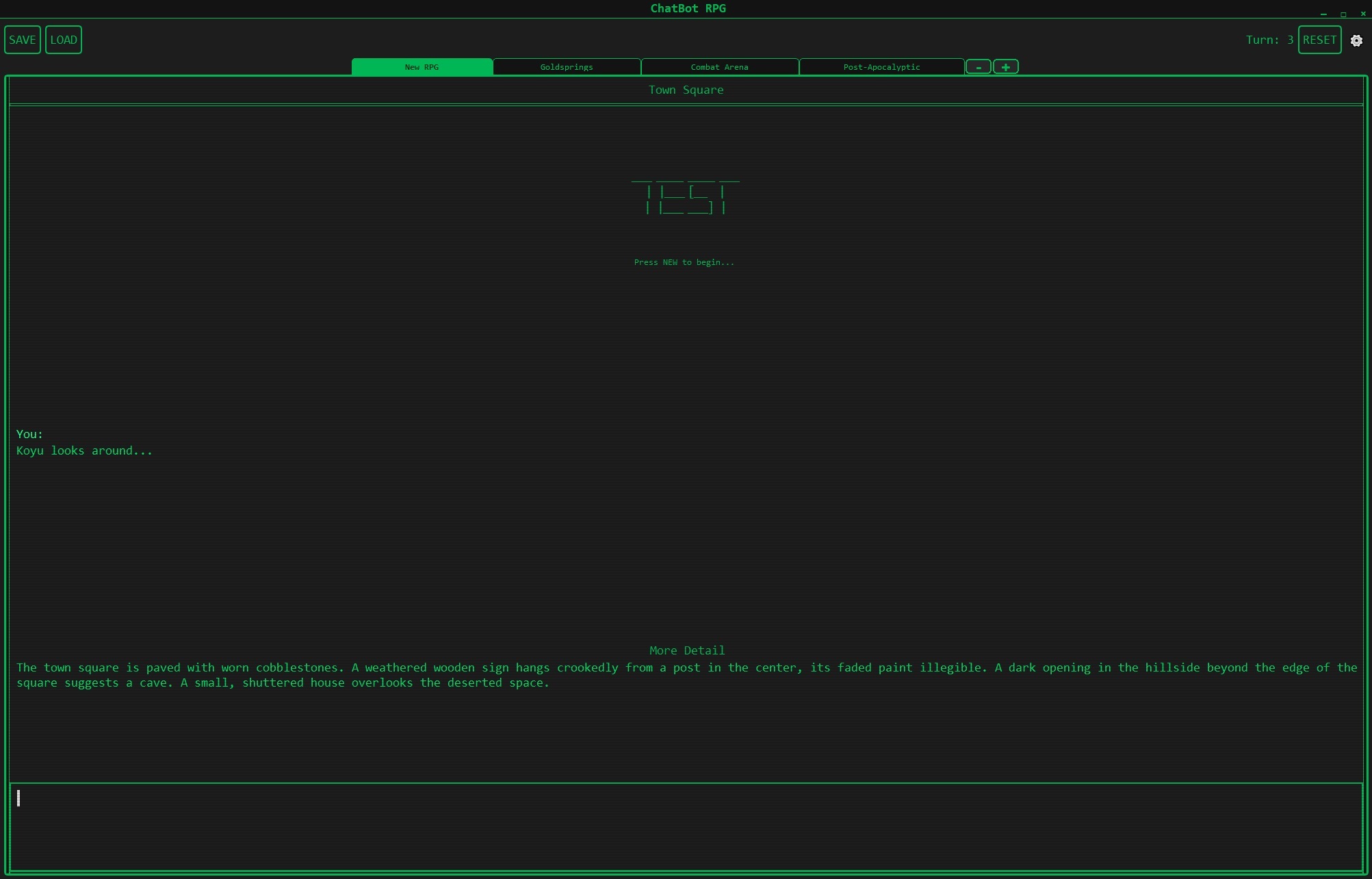 Town Square scene showing the core text-adventure interface with CRT-style green-on-black theme. Note the scene tabs at top (New RPG, Goldsprings, Combat Arena, Post-Apocalyptic) and turn counter in upper right.
Screenshot 2: NPC Interaction & Follow Mechanics
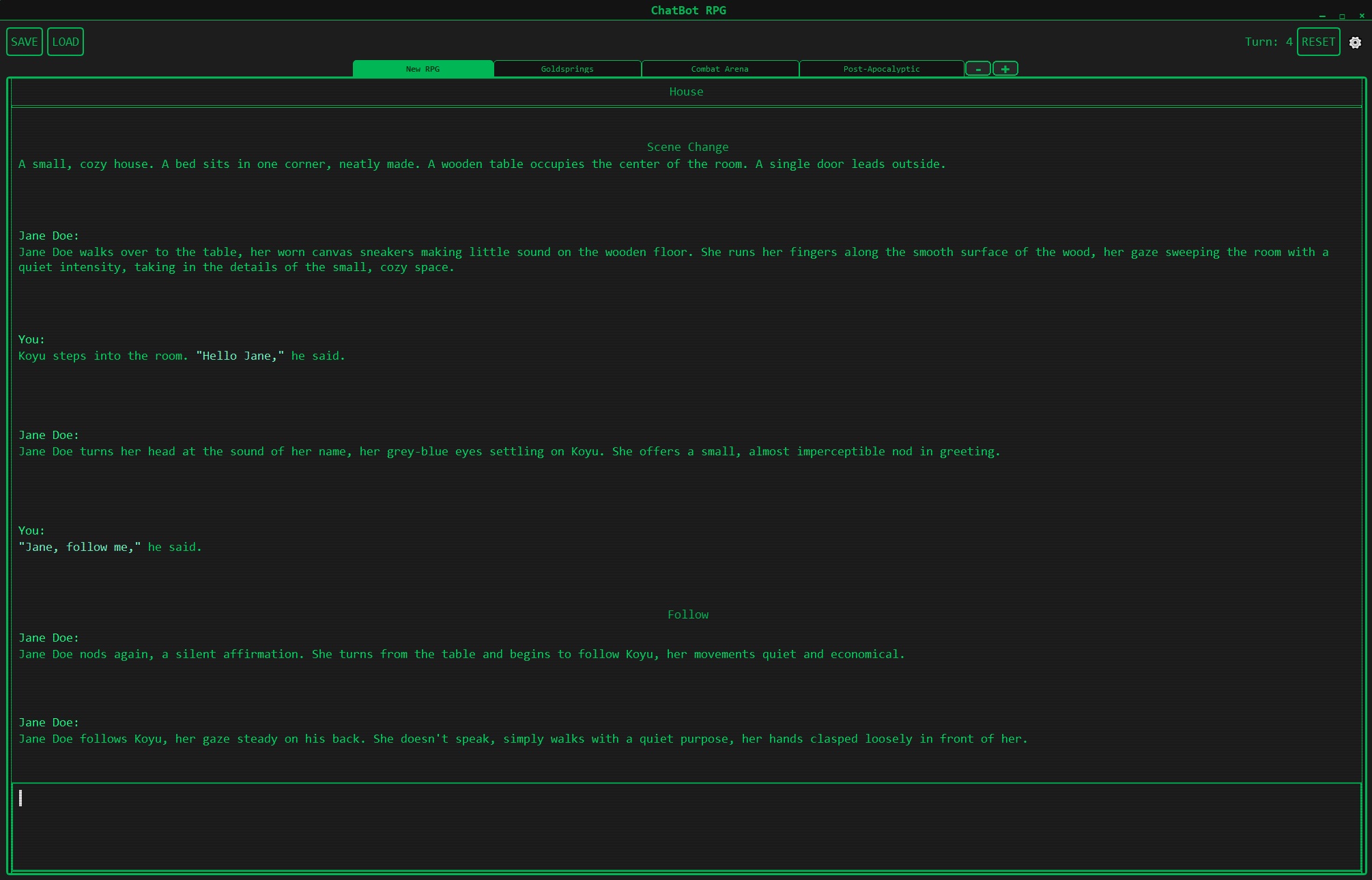 Conversation with Jane Doe demonstrating natural dialogue and party mechanics. The “Follow” tag appears when NPCs join the party, showcasing working companion AI that persists across scenes.
Screenshot 3: Visual Rule Editor
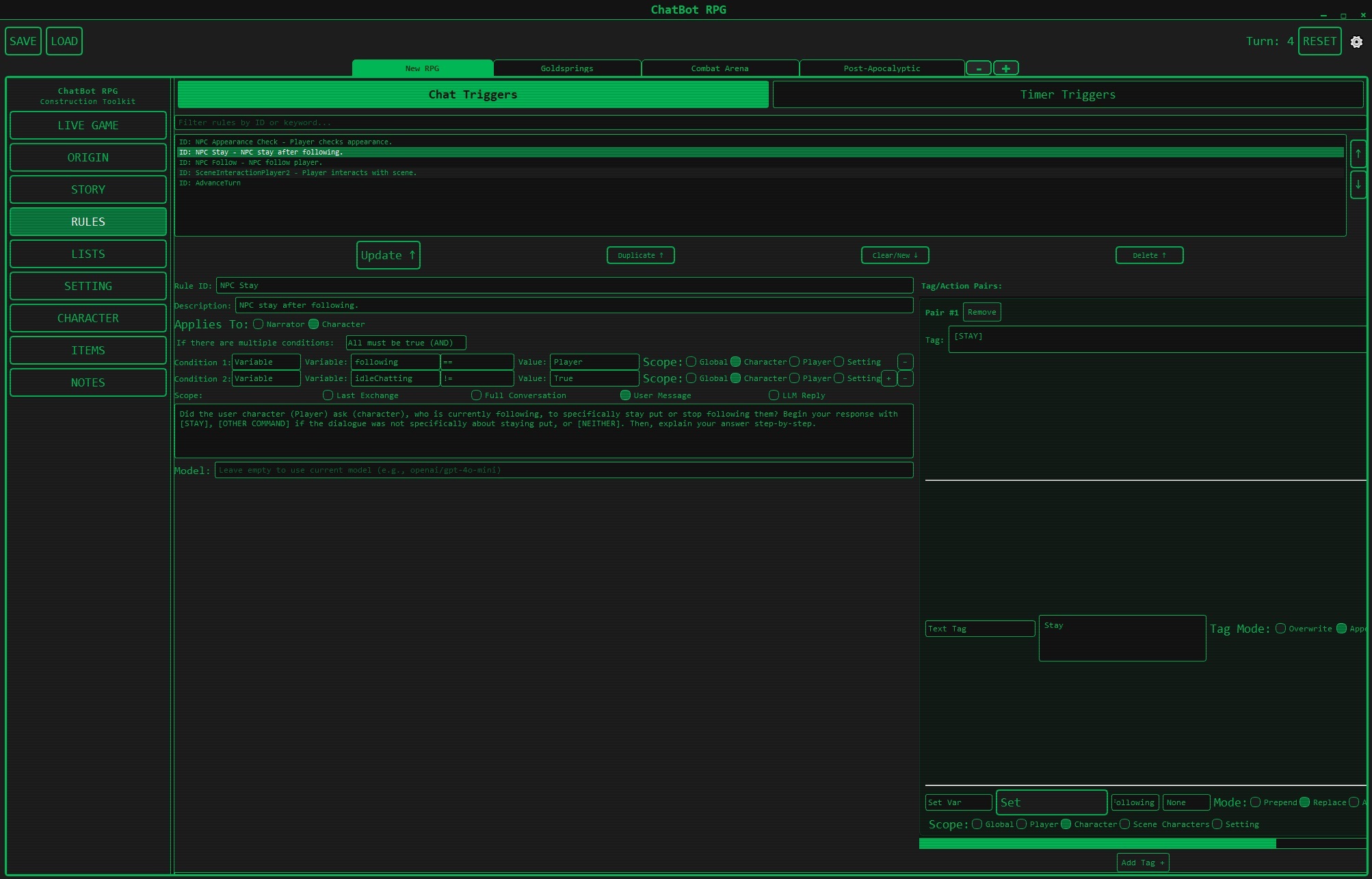 The trigger-based “if this, then that” rules system. Shows chat triggers, timer triggers, variable conditions, and scoping (Global/Player/Character/Scene). This is the visual programming interface that eliminates the need for coding.
Screenshot 4: Map Editor
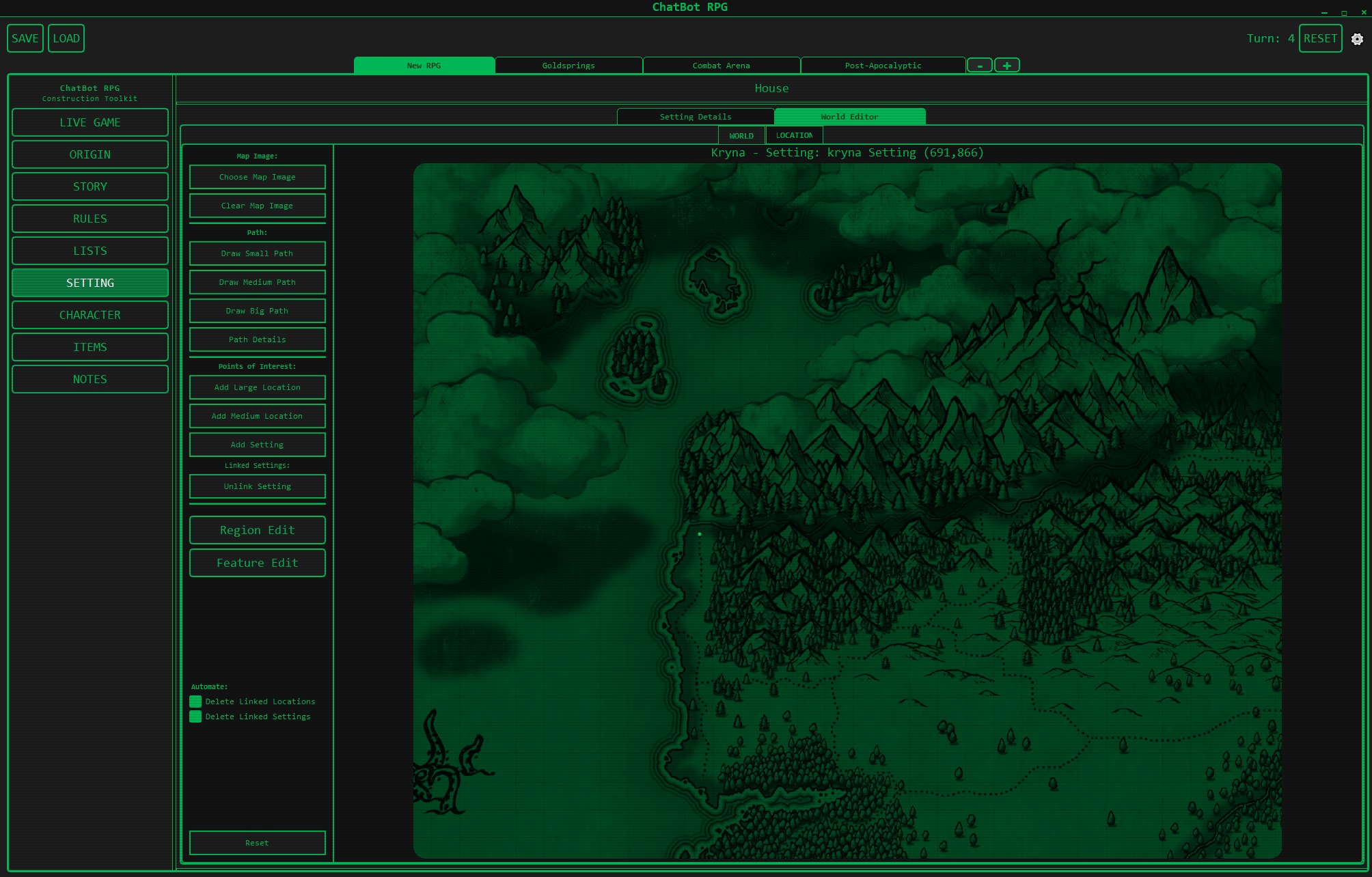 Integrated map visualization showing locations (Goldsprings, Combat Arena, Post-Apocalyptic) with visual routes between scenes. Displays the scene change system with adjacency relationships.
Screenshot 5: Character Editor
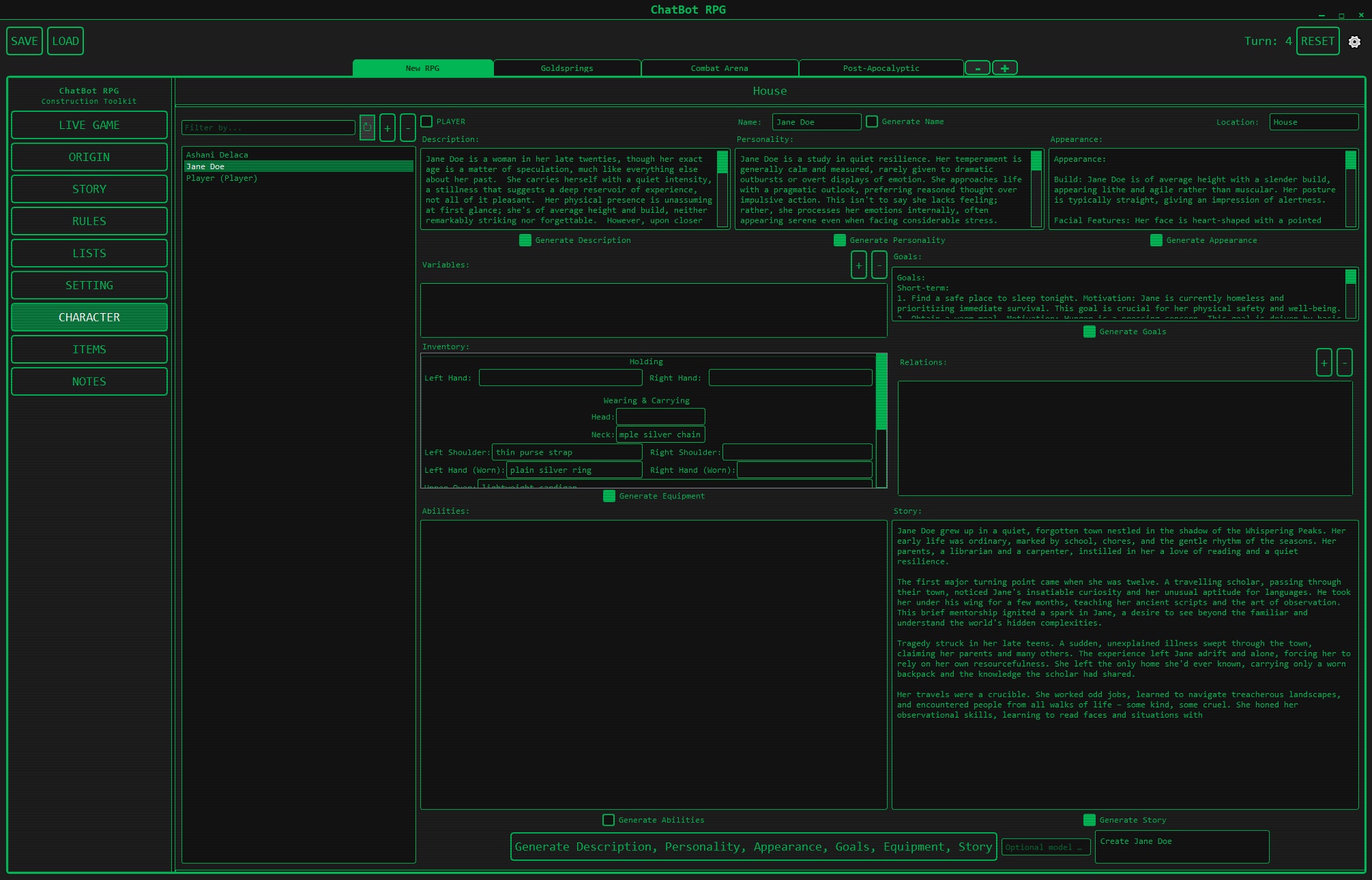 Character creation interface with LLM-assisted generation. Shows Jane Doe’s full character sheet including description, personality, appearance, goals, equipment, abilities, and story. Features “Generate” buttons for AI-assisted content creation.
appl2613 [22:46]: Design philosophy notes:
”— the theme, yes I know its all one color. Its supposed to have an old crt monitor theme (you can change the color). Reasons span from it being relatively easy for me to extend as Im far more focused on the game than the theme at the moment, to paying respects to the original text-adventures like Zork and that whole retro era”
appl2613 [22:46]: Technical architecture described:
- Scene system: Move between scenes/settings, natural language determines exits to adjacent scenes
- Context management: Wiped after each scene change, preventing context overflow
- Group chat model: Player, narrator, and present characters in multi-agent conversation
- Rule engine: Trigger-based system providing “an entire RPG’s worth of flexibility without having to write code”
- JSON format: All building blocks (rules, characters, settings) in JSON for LLM manipulation
- Random lists: Define randomized content to avoid “Elara from Eldoria” syndrome
- SQLite storage: Everything tucked into .world files for games, .save files for playthroughs
appl2613 [22:50]: Development status:
“Yes — like, 90%. Im sure theres a lot of bugs that will get run into once content-creation goes into play… Still been looking around the internet for other stuff like this and…nope. Not seeing it just yet, it’s still all character-card bite-sized RP”
appl2613 [23:02]: UX philosophy insight:
“a rapid series of shorter messages, but a more responsive world, and characters who talk in short lines or in a conversational manner that feels very realtime (to which I’ve added timers, which will allow DMs to give their NPCs everything from idle-chatter to timed consequences in combat).. its so much more real-feeling when the architecture is there for it”
“things feel so much more alive when the length and fluidity of posts and their turn-orders can fluctuate depending on whether you’re in a bar, a liminal space, or a boss battle”
Design Insight
The long descriptive paragraphs in traditional RP are a product of sacrifice (async human players, different timezones). LLM-powered games can support rapid, natural dialogue with varied turn structures based on context.
Phase 13: Model Selection UI (Throughout)
Discussion of model selection interfaces:
- Dropdown for OpenRouter models
- Local inference URL configuration
- Multi-model workflows (different models for different tasks)
- API key management
monkeyrithms [19:41]: API configuration interface:
if url_type == "url1": #Use this for following basic instructions
    base_url = "https://openrouter.ai/api/v1"
    api_key = "put your API here"
    model_choice = "mistralai/mixtral-8x7b-instruct"

elif url_type == "url2": #Use this for creative writing characters
    base_url = "https://openrouter.ai/api/v1"
    api_key = "put your API here"
    model_choice = "mistralai/mixtral-8x7b-instruct"
monkeyrithms [19:44]: “It tries to split different types of workload to different models, which allows you to specialize with models and/or save on inference costs (for instance, the only 2 we need a somewhat decent model for are the last 2)”
UX Insight
Allow users to assign different models to different tasks (narration vs logic vs creativity) through UI.
Technical Patterns
1. PyQt5 Desktop Architecture (ChatBot RPG)
class MainWindow(QMainWindow):
    - Custom text edit widget for chat
    - Threading for LLM inference
    - Signal/slot pattern for updates
    - Menu bars for settings/actions
    - Visual indicators (colors, borders)
    - Persistent state in background

Threading Pattern:
- Main thread: GUI event loop
- Worker thread: LLM inference + game logic
- Signals: Communication between threadsPros:
- Native performance
- No network required
- Single executable distribution
- Direct file system access
Cons:
- Platform-specific issues (fonts, DLLs)
- Complex threading model
- Harder to update remotely
- Python environment setup required
2. Next.js/React Web Architecture (ReallmCraft)
Frontend (Next.js/React + Material UI)
    ↓ REST API calls
Backend (Flask + Python)
    ↓
Game Engine Logic
    ↓
Data Layer (TinyDB/SQLite)
Pros:
- Cross-platform by default
- Easy to update (just refresh)
- Modern UI component libraries
- No Python env for end users
Cons:
- Requires backend server running
- CORS complexity
- Network latency
- Browser limitations
3. Visual Programming Pattern
GUI Form/Editor
    ↓
Generate JSON Configuration
    ↓
Store in Database
    ↓
Engine reads config at runtime
    ↓
Execute defined rules/triggers
ChatBot RPG’s innovation: Non-programmers can create games through forms and visual editors.
4. Multi-Model UI Pattern
User Action Type → Model Selection
├─ Logic/Rules → Fast, cheap model (GPT-3.5)
├─ Narration → Creative model (Mixtral)
├─ Dialogue → Character-focused model
└─ Quest Management → Reliable model
UI provides dropdowns/config for each category.
Design Principles
- Non-Blocking Inference: Never freeze the UI during LLM calls
- Visual Feedback: Show status, progress, and state changes visually
- Persistent Context: Display relevant state (quests, inventory) alongside chat
- Graceful Degradation: Handle slow/failed inference without crashing
- Configuration Before Play: Set up API keys, models, and settings before starting
- Visual Programming: Enable game creation without code (where possible)
- Separation of Concerns: UI layer → API layer → Game logic layer
- Platform Awareness: Choose stack based on distribution needs
Implementation Considerations
Desktop (PyQt5)
- Threading is essential: Async is harder in Qt, threading works well
- Font/system issues: Test on multiple platforms early
- Distribution: PyInstaller or similar for executables
- Updates: Manual download/install or auto-update system needed
- File access: Direct, no CORS issues
Web (React/Next.js)
- Backend required: Flask, FastAPI, or Node.js server
- CORS configuration: Proxy or proper headers required
- State management: Redux, Context, or component state
- Real-time updates: WebSockets or polling for live game state
- Distribution: Hosted web app or Electron/Tauri wrapper
Hybrid (Tauri/Electron)
- Best of both worlds: Native packaging + web frontend
- Tauri: Lighter (Rust), smaller binaries
- Electron: More mature, larger community, heavier
- Auto-updates: Built-in for both
UX Challenges Specific to LLM Games
- Inference Latency: 5-30+ seconds per response requires loading indicators
- Unpredictable Output: LLM might generate unexpected results, need reroll UI
- Context Limits: Visual indication when context is full
- Multi-Model Complexity: Users may not understand why multiple models are needed
- API Key Management: Security vs convenience trade-off
- Error Handling: LLM APIs fail often, UI must handle gracefully
- State Visualization: Complex game state is hard to display compactly
UI Component Patterns
Chat Interface
- Message history scrolling
- User input field (always visible)
- Typing indicators during inference
- Reroll/regenerate buttons
- Message editing capability
Side Panels
- Quest log (collapsible)
- Inventory grid/list
- Character stats (live updates)
- Map/location view
- Active NPCs in scene
Settings/Configuration
- Model selection dropdowns
- API key inputs (password fields)
- Temperature/parameter sliders
- Workflow editor (if applicable)
- Template management
Visual Editors
- Trigger/rule builder
- Quest flowchart editor
- Character sheet forms
- Location property editor
- Item creator
Status Indicators
- Combat mode (red overlay)
- Current location (always visible)
- Time/date display
- Health/status bars
- Loading/thinking animations
Related Topics
- 01-Architecture-and-Design - Backend architecture that UI connects to
- 02-Prompt-Engineering - How UI presents prompts affects UX
- 03-RAG-and-Memory - Displaying retrieved context in UI
- 05-State-Management - UI reflects and modifies state
- 07-Models-and-APIs - Model selection interfaces
- User-veritasr - Next.js + Flask approach
- User-appl2613 - PyQt5 + visual programming approach
Tools and Technologies
Desktop Stack
- PyQt5: Python GUI framework
- Threading: Python threading module
- PyInstaller: Executable packaging
- Qt Designer: Visual UI design tool
Web Stack
- React: UI library
- Next.js: React framework with SSR
- Material UI: Component library
- Tailwind CSS: Utility-first CSS
- Flask: Python backend API
- FastAPI: Alternative Python API framework
- Axios: HTTP client
Hybrid Stack
- Tauri: Rust + web frontend
- Electron: Node.js + web frontend
- Neutralino: Lightweight alternative
Key Insights
- Threading is non-negotiable for desktop LLM UIs - inference blocks otherwise
- Web frontends are easier to develop but require backend servers
- Visual programming is achievable with good form/editor design
- Multi-model UIs are complex but necessary for optimal performance/cost
- Desktop vs web is a distribution choice - web is easier to update, desktop is easier to distribute
- PyQt5 works well despite platform quirks
- Next.js + Flask emerged as solid web pattern
- Visual feedback is critical - users need to know LLM is thinking
- Persistent side panels solve the “where’s my inventory?” problem
- API key management in UI is a persistent UX challenge
Best Practices
For Desktop (PyQt5)
# Use threading for inference
class InferenceWorker(QThread):
    finished = pyqtSignal(str)

    def run(self):
        result = call_llm_api()
        self.finished.emit(result)

# Connect to main UI
worker = InferenceWorker()
worker.finished.connect(self.update_chat)
worker.start()
For Web (React + Flask)
// Non-blocking API calls
async function sendMessage(msg) {
    setLoading(true);
    try {
        const response = await fetch('/api/generate', {
            method: 'POST',
            body: JSON.stringify({ message: msg })
        });
        const data = await response.json();
        updateChat(data);
    } finally {
        setLoading(false);
    }
}
Visual Feedback
- Always show loading state during inference
- Provide cancel button for long operations
- Display estimated time if possible
- Use progress bars or animated indicators
- Show which model is being used
Error Handling
- Catch API failures gracefully
- Provide clear error messages
- Offer retry button
- Fall back to cached/default content if possible
- Log errors for debugging
Open Questions
Unresolved Issues
- How to visualize complex game state (hundreds of NPCs, items) without overwhelming users?
- Best way to handle real-time multiplayer in either desktop or web UI?
- Should UI allow direct state editing or force it through game actions?
- How to make visual programming editors powerful without overwhelming users?
- What’s the right balance between automation (LLM-generated) and manual (form-based) content creation in UI?
Timeline
- January 2024: Early PyQt5 development, threading challenges
- January 2024: Font/platform issues discovered
- February 2024: Next.js + Flask stack chosen for ReallmCraft
- February 2024: API key management UI discussions
- February 2024: Persistent drawer/panel patterns emerge
- Mid 2024: CORS handling, proxy configuration
- Mid 2024: Dynamic form generation for templates
- Late 2024: Tauri consideration for native wrapping
- 2024-2025: Visual rule editor development for ChatBot RPG
- July 2025: ChatBot RPG released with full GUI
Related Threads
- 01-Architecture-and-Design - UI architectural patterns
- 05-State-Management - UI state synchronization
- 07-Models-and-APIs - API integration in UI
- User-monkeyrithms - Visual rule editor creator
- User-veritasr - Next.js web frontend
Related Enrichment Outputs
Pattern Library
- 00-PATTERN-INDEX - Complete pattern library
- api-abstraction-layer - JSON APIs for UI-backend communication
Core Achievement
The community successfully demonstrated two viable UI approaches for LLM game engines: desktop (PyQt5) and web (Next.js/React). Both work well, choice depends on distribution needs. Key innovation: Visual programming interfaces allow non-programmers to create games. Threading/async is essential for responsive UIs during slow LLM inference.